
PHP Versions
Yerd runs any number of PHP versions side by side and lets you pick which one each site uses. PHP isn't bundled, so the install stays small. The first time you ask for a version, Yerd downloads a prebuilt, statically-linked PHP build that Yerd publishes itself (signed and checksummed) and supervises one PHP-FPM pool per version behind the reverse proxy.
In the desktop app
The fastest way to manage PHP is the PHP page (under the Environment group) in the desktop app. It's a live view of every installed version and the controls to change them, with no commands to remember.
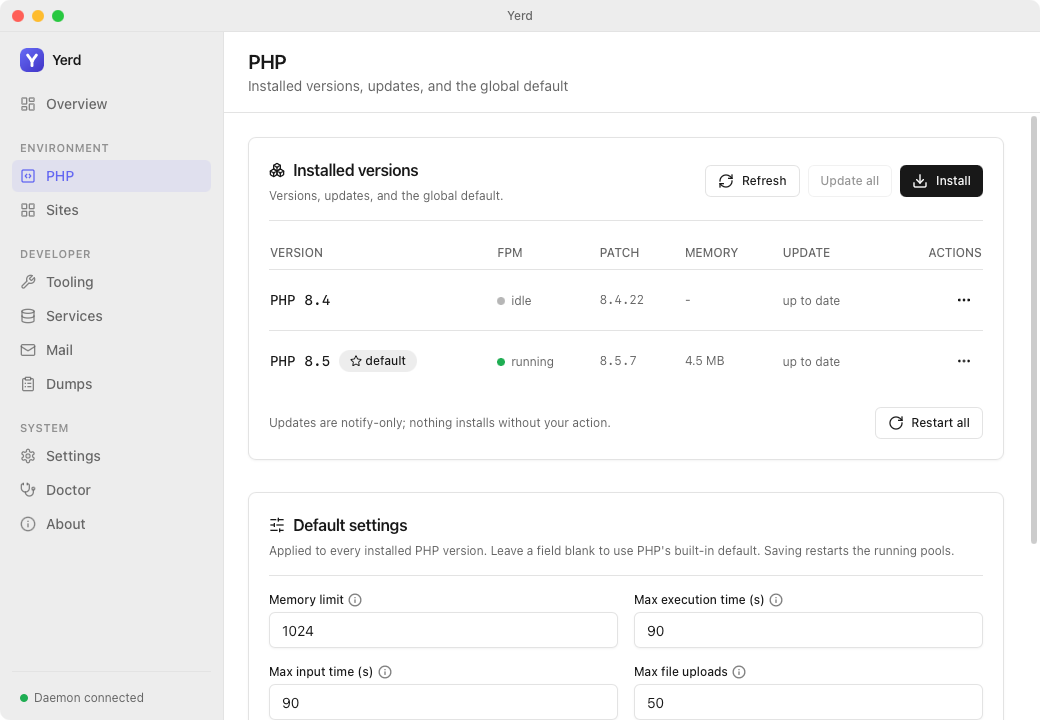
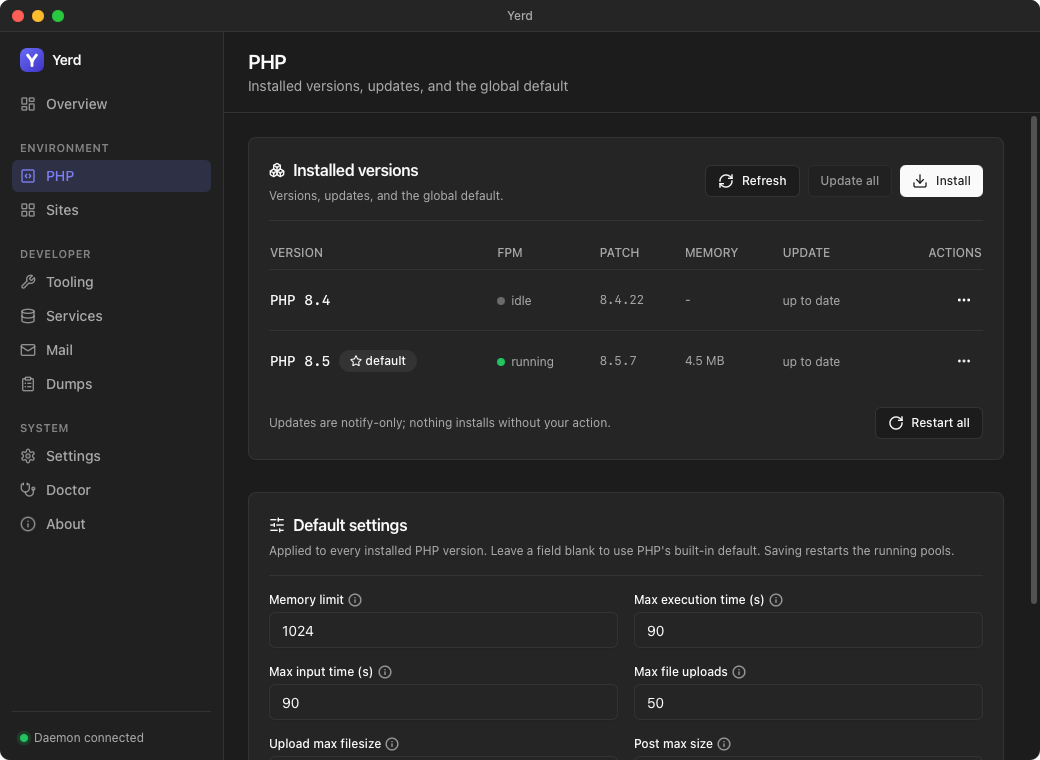
- A table of installed versions shows live FPM pool state, patch level, pool memory (RSS), and whether an update is available.
- Install opens a picker of installable versions (already-installed ones are hidden); progress streams live next to the Install button as the prebuilt static build downloads. An Install a legacy version toggle (off by default) swaps the picker over to the legacy minors (7.4 / 8.0 / 8.1) behind a warning block and a mandatory confirmation checkbox; when every current version is already installed the toggle starts on and locks there, since legacy is all that's left to add.
- Refresh re-checks for updates and Update all updates every version with one pending - updates are notify-only.
- Each row's
⋯menu offers Restart, Set default (marks it with a star; disabled for legacy rows, which are tagged with alegacybadge), Update (when available), and Uninstall; Restart all restarts every running pool. - A Default settings card edits the global ini defaults applied to every version; leave a field blank to use PHP's built-in default, and saving restarts running pools to apply.
- A Per-version configuration card lists your versions down the side, newest first; picking one shows everything scoped to it: the settings form (empty fields inherit the defaults; see Per-version configuration), its custom extensions, and a free-form ini-directive editor (e.g.
xdebug.mode = debug). Each row badges how much that version has configured and marks unsaved edits, so switching versions never loses work. Saving restarts only that version's pool.
From the command line
Installing a version
yerd install php 8.5Yerd detects your platform (linux/macos, x86_64/aarch64), fetches Yerd's signed php.json manifest, resolves the single published build for your platform and minor, downloads the CLI and FPM tarballs, verifies each against its published SHA-256, then atomically swaps them into place. The manifest is the source of truth for what's installable, so a new PHP patch becomes available as soon as Yerd's build pipeline publishes it.
Installs are idempotent: running it again replaces the directory with a fresh download of the current build. If the version isn't published for your platform, the install fails cleanly and writes nothing. The running daemon picks up a new version automatically, no restart required.
A version is always a major.minor
A "PHP version" means a major.minor pair like 8.5, never a full patch like 8.3.12. Yerd installs and tracks the latest patch of the minor you ask for, and updates move you to a newer patch of that same minor. Input is 8.5 (or php8.5); major must be 5..=9, minor 0..=99.
Downloads are signed and hash-verified
The php.json manifest is signed with a dedicated minisign key whose public half is embedded in Yerd; the daemon verifies that signature before trusting the manifest, then verifies each downloaded tarball against the SHA-256 the manifest lists. Because PHP runs as you, this verification is on the install critical path, not just updates.
Legacy PHP versions
Yerd also serves three out-of-support minors - 7.4, 8.0, and 8.1 - from a separate, independently-signed php-legacy.json manifest. It's the same minisign key and the same per-tarball SHA-256 verification as php.json, just a different listing.
These versions are past their upstream end of life and may contain unpatched security vulnerabilities, so installing one requires an explicit opt-in:
yerd install php 7.4 --legacyRunning yerd install php 7.4 without --legacy refuses and prints an out-of-support warning instead of installing. In the desktop app, the Install picker's Install a legacy version toggle replaces the version list with the legacy minors and opens a warning block and a mandatory confirmation checkbox ("I understand and want to install this legacy version anyway.") before the Install button is enabled.
A legacy version carries hard restrictions once installed:
- Cannot be the global default.
yerd use 7.4is refused; the desktop app disables Set default for legacy rows. - No code coverage.
phpcover,php7.4cover/php8.0cover/php8.1cover, andyerd coverageall error rather than run - see Code Coverage. - No yerd-dumps capture. The Dumps view flags legacy rows as unsupported - see Laravel Dumps.
- No
pcovoryerd-dump.sobuilds. Neither extension is built for EOL PHP, which is why coverage and dumps don't work on legacy versions.
A legacy version can still be assigned to an individual site (yerd use my-app 7.4), just not as the global default. See Per-site versions.
Bundled extensions
Yerd's builds ship the bulk extension set, so a real-world Laravel app has what it needs out of the box - highlights include intl (ICU, required by Laravel's Number helper), sodium, mysqli, gd, imagick, redis, opcache, and swoole. Database access is covered by the pdo_mysql, pdo_pgsql, and pdo_sqlite PDO drivers (so PDO::getAvailableDrivers() returns all three) alongside the native mysqli, pgsql, and sqlite3 extensions. Coverage is provided separately by pcov - see Code Coverage.
The authoritative list for any install is php -m (via the php shim); the full set for the current builds is below. It rarely changes between patch updates.
Full bundled extension list (PHP 8.5; 8.4 is identical minus lexbor and uri)
Entries marked (core) are part of every standard PHP build; the rest are the extras Yerd's "bulk" build adds. Two extensions are new in PHP 8.5 and absent on 8.4, as noted.
| Extension | What it does |
|---|---|
apcu | In-process shared-memory cache (APCu) for storing user data across a pool's requests. |
bcmath | Arbitrary-precision decimal arithmetic for money and other exact-math needs. |
bz2 | bzip2 stream compression and decompression. |
calendar | Conversions between calendar systems (Julian day count, Gregorian, Jewish, French). |
Core | (core) The PHP engine itself: language constructs and built-in functions. |
ctype | (core) Fast character-class checks such as ctype_digit() and ctype_alpha(). |
curl | Network transfers via libcurl (HTTP/S, FTP, and more); the default backend for Guzzle. |
date | (core) Date and time handling, including DateTime and timezone data. |
dba | Key/value database abstraction over dbm-style engines (GDBM and friends). |
dom | (core) Tree-based DOM API for reading and manipulating XML and HTML documents. |
event | libevent bindings for event-driven, non-blocking I/O loops. |
exif | Reads EXIF metadata (camera, orientation, GPS) embedded in image files. |
fileinfo | (core) Detects a file's MIME type from its contents rather than its name. |
filter | (core) Validates and sanitizes data with filter_var() (emails, URLs, ints, …). |
ftp | Client-side FTP protocol support. |
gd | Image creation and manipulation: resize, crop, draw, and convert common formats. |
gmp | Arbitrary-precision integer arithmetic via GNU MP, faster than bcmath for big integers. |
hash | (core) General hashing framework (hash(), HMAC) covering many algorithms. |
iconv | (core) Character-set conversion between text encodings. |
imagick | ImageMagick bindings for advanced image processing and a wide range of formats. |
imap | Access to IMAP, POP3, and NNTP mailboxes. |
intl | Unicode/ICU internationalization: number and date formatting, collation, transliteration - required by Laravel's Number helper. |
json | (core) JSON encoding and decoding. |
lexbor | New in PHP 8.5. The Lexbor HTML5 engine powering the new \Dom\HTMLDocument parser. |
libxml | (core) The shared libxml2 foundation the other XML extensions build on. |
mbstring | Multibyte-safe string functions for UTF-8 and other encodings. |
mysqli | The improved, feature-complete MySQL/MariaDB driver. |
mysqlnd | The native driver backend that mysqli and PDO's MySQL driver run on. |
openssl | TLS, symmetric/asymmetric encryption, signatures, and X.509 certificate handling. |
opentelemetry | Engine hooks that let OpenTelemetry auto-instrument code for tracing and metrics. |
pcntl | Unix process control (fork, signals, waitpid) for CLI worker processes. |
pcre | (core) Perl-compatible regular expressions, i.e. the preg_* functions. |
PDO | (core) The database-access abstraction layer; the bundled drivers cover MySQL, PostgreSQL, and SQLite. |
pdo_mysql | PDO driver for MySQL/MariaDB. |
pdo_pgsql | PDO driver for PostgreSQL. |
pdo_sqlite | PDO driver for SQLite. |
pgsql | Native PostgreSQL client library (libpq-backed pg_* functions). |
Phar | (core) PHP Archive support: bundle a whole application into one distributable file. |
posix | POSIX system-call bindings (users, groups, process info) on Unix. |
protobuf | Google Protocol Buffers runtime for compact, fast binary (de)serialization. |
random | (core) The modern randomness API (Randomizer engines, random_int()). |
readline | Interactive line editing and history for CLI and REPL programs. |
redis | Client for the Redis / Valkey in-memory data store (phpredis). |
Reflection | (core) Runtime introspection of classes, functions, and attributes. |
session | (core) Server-side session state management. |
shmop | Direct read/write access to shared-memory segments. |
SimpleXML | (core) Simple object-oriented access to XML documents. |
soap | SOAP client and server for XML web services. |
sockets | Low-level BSD sockets API for building custom network protocols. |
sodium | (core) Modern libsodium cryptography: authenticated encryption, signing, and hashing. |
SPL | (core) Standard PHP Library: data-structure classes, iterators, and interfaces. |
sqlite3 | The self-contained, embedded SQLite database engine. |
standard | (core) PHP's standard function library (strings, arrays, math, files, URLs, …). |
swoole | Coroutine-based async runtime and high-performance server framework. |
sysvmsg | System V message-queue inter-process communication. |
sysvsem | System V semaphores for coordinating processes. |
sysvshm | System V shared-memory inter-process communication. |
tokenizer | (core) Tokenizes PHP source code; used by linters and static analysis tools. |
uri | New in PHP 8.5. A built-in, spec-compliant URI parser (RFC 3986 and WHATWG). |
xml | (core) Event-based (SAX/Expat) XML parsing. |
xmlreader | (core) Pull-based streaming reader for large XML documents. |
xmlwriter | (core) Streaming writer for generating XML. |
xsl | XSLT 1.0 stylesheet transformations over the DOM. |
Zend OPcache | Caches compiled PHP bytecode in shared memory so scripts aren't re-parsed each request (a Zend extension). |
zip | Reading and writing ZIP archives. |
zlib | gzip / deflate stream compression. |
Need something not in this set? Register your own with yerd php ext.
Legacy versions (7.4 / 8.0 / 8.1) ship a smaller, uniform extension set built once across all three EOL minors, dropping a few extensions that need PHP 8.0+ or a newer swoole than 7.4 can run.
Legacy build extension list (7.4 / 8.0 / 8.1 - identical across all three)
| Extension | What it does |
|---|---|
apcu | In-process shared-memory cache (APCu) for storing user data across a pool's requests. |
bcmath | Arbitrary-precision decimal arithmetic for money and other exact-math needs. |
bz2 | bzip2 stream compression and decompression. |
calendar | Conversions between calendar systems (Julian day count, Gregorian, Jewish, French). |
ctype | Fast character-class checks such as ctype_digit() and ctype_alpha(). |
curl | Network transfers via libcurl (HTTP/S, FTP, and more); the default backend for Guzzle. |
dba | Key/value database abstraction over dbm-style engines (GDBM and friends). |
dom | Tree-based DOM API for reading and manipulating XML and HTML documents. |
event | libevent bindings for event-driven, non-blocking I/O loops. |
exif | Reads EXIF metadata (camera, orientation, GPS) embedded in image files. |
fileinfo | Detects a file's MIME type from its contents rather than its name. |
filter | Validates and sanitizes data with filter_var() (emails, URLs, ints, …). |
ftp | Client-side FTP protocol support. |
gd | Image creation and manipulation: resize, crop, draw, and convert common formats. |
gmp | Arbitrary-precision integer arithmetic via GNU MP, faster than bcmath for big integers. |
iconv | Character-set conversion between text encodings. |
imagick | ImageMagick bindings for advanced image processing and a wide range of formats. |
imap | Access to IMAP, POP3, and NNTP mailboxes. |
intl | Unicode/ICU internationalization: number and date formatting, collation, transliteration. |
mbregex | Multibyte-aware regular expressions (the mb_ereg* functions). |
mbstring | Multibyte-safe string functions for UTF-8 and other encodings. |
mysqli | The improved, feature-complete MySQL/MariaDB driver. |
mysqlnd | The native driver backend that mysqli and PDO's MySQL driver run on. |
opcache | Caches compiled PHP bytecode in shared memory so scripts aren't re-parsed each request. |
openssl | TLS, symmetric/asymmetric encryption, signatures, and X.509 certificate handling. |
pcntl | Unix process control (fork, signals, waitpid) for CLI worker processes. |
pdo | The database-access abstraction layer. |
pdo_mysql | PDO driver for MySQL/MariaDB. |
pdo_pgsql | PDO driver for PostgreSQL. |
pdo_sqlite | PDO driver for SQLite. |
pgsql | Native PostgreSQL client library (libpq-backed pg_* functions). |
phar | PHP Archive support: bundle a whole application into one distributable file. |
posix | POSIX system-call bindings (users, groups, process info) on Unix. |
protobuf | Google Protocol Buffers runtime for compact, fast binary (de)serialization. |
readline | Interactive line editing and history for CLI and REPL programs. |
redis | Client for the Redis / Valkey in-memory data store (phpredis). |
session | Server-side session state management. |
shmop | Direct read/write access to shared-memory segments. |
simplexml | Simple object-oriented access to XML documents. |
soap | SOAP client and server for XML web services. |
sockets | Low-level BSD sockets API for building custom network protocols. |
sodium | Modern libsodium cryptography: authenticated encryption, signing, and hashing. |
sqlite3 | The self-contained, embedded SQLite database engine. |
sysvmsg | System V message-queue inter-process communication. |
sysvsem | System V semaphores for coordinating processes. |
sysvshm | System V shared-memory inter-process communication. |
tokenizer | Tokenizes PHP source code; used by linters and static analysis tools. |
xml | Event-based (SAX/Expat) XML parsing. |
xmlreader | Pull-based streaming reader for large XML documents. |
xmlwriter | Streaming writer for generating XML. |
xsl | XSLT 1.0 stylesheet transformations over the DOM. |
zip | Reading and writing ZIP archives. |
zlib | gzip / deflate stream compression. |
Dropped versus the stable builds:
opentelemetry- requires PHP 8.0+, which breaks the 7.4 build outright.swoole- the pinnedswoolebuild needs a newer PHP than 7.4 and would fragment across the three EOL minors, so it's dropped to keep one uniform legacy set.swoole-hook-mysql- depends onswoole.pcovandyerd-dump- the external.sopartners fromforjedio/yerd-php-extaren't built for EOL PHP, which is why coverage and dumps don't work on legacy versions.
Custom extensions
When you need an extension Yerd's builds don't ship (a PECL module like scrypt, or your own compiled .so), register it with yerd php ext. Yerd loads it into both the web (FPM) runtime and the CLI for that version, so extension_loaded() returns true on a .test route and php -m lists it - the two used to diverge.
yerd php ext add 8.5 /opt/homebrew/lib/php/pecl/20250925/scrypt.so
yerd php ext list
yerd php ext remove 8.5 scrypt- Extensions are tied to a PHP version. A native
.sois compiled against one PHP minor, so you register it under the version it was built for (8.5above); it loads only for that version. - Every add is load-probed. Before saving, Yerd actually loads the
.sointo that version's PHP and rejects it if it can't load - a wrong-version build, a missing dependency, or a Zend extension registered without--zendfails with a clear message instead of silently breaking your pools. - Zend extensions (xdebug/opcache-style) use
--zend:yerd php ext add 8.5 /path/xdebug.so --zend. - Naming. The removal handle defaults to the
.sofilename (scryptabove); override it with--name. - Missing files are handled gracefully: if a registered
.solater disappears (e.g. Homebrew bumps its PECL directory on upgrade), Yerd skips it with a warning rather than failing to start the pool, andyerd php ext listmarks it(missing!).
Adding or removing an extension restarts that version's running FPM pool to apply it. In the desktop app, the same registry lives in the Extensions section of the Per-version configuration card on the PHP page: pick the version's tab, then Add… to browse for a .so. An extension whose file has gone missing is flagged, and its ⋯ menu can seed a matching ini directive. Registered extensions are stored per version in the config file - see the Configuration Reference.
How versions are stored
Each install lands under the per-user data directory:
{data}/php/php-8.5/bin/php          # the CLI interpreter
{data}/php/php-8.5/sbin/php-fpm     # the FastCGI process manager
{data}/php/php-8.5/.yerd-version    # the exact patch installed, e.g. "8.5.6"
{data}/bin/php                      # the default-version CLI shim
{data}/bin/php8.5                   # a per-version CLI shim
The dir is named for the major.minor (php-8.5); .yerd-version records the exact patch (8.5.6). Update checks read that marker to decide whether a newer patch exists. The daemon discovers installed versions by walking this directory and finding each sbin/php-fpm at startup.
The global default
Yerd has one global default version, used for the php shim at {data}/bin/php and as the fallback for any site that hasn't pinned its own. Set it with one argument:
yerd install php 8.5
yerd use 8.5
A fresh config defaults to PHP 8.3, but you'll usually set your own right after installing.
Legacy versions can't be the default
A legacy version (7.4 / 8.0 / 8.1) is ineligible as the global default - yerd use 7.4 is refused client-side, and the desktop app disables Set default for legacy rows. It can still be pinned to an individual site.
Add the shim dir to your PATH
Put {data}/bin (Yerd prints the exact path) on your PATH so a bare php matches the version your sites run. The bare php shim resolves the current default at run time, so yerd use takes effect immediately with nothing to re-point.
Alongside the default php shim, Yerd maintains a php<version> shim for each installed version (php8.4, php8.3, ...) so you can reach a specific version directly, plus phpcover / php<version>cover shims that run PHP with the pcov coverage driver enabled. See Code Coverage. Each shim runs the right PHP with that version's ini and any custom extensions you've registered.
Per-site versions
Any site can pin its own version. Pass yerd use two arguments, a site name and a version:
yerd use my-app 8.3Now my-app.test runs on 8.3 while every other site follows the global default.
| Site setting | Effective version |
|---|---|
Pinned (yerd use <site> 8.3) | 8.3 |
| Not pinned | the global default |
Clearing a pin reverts the site to whatever the global default is at the time.
Check what each site resolves to with yerd sites, which lists every site with its kind, PHP version, HTTPS state, and document root. See Sites for parking and linking.
Pin a version you've installed
Pinning a site (or the default) to an uninstalled version means there's no FPM binary to start when a request arrives. Install it first (yerd install php 8.3), then pin. yerd doctor flags a pool that can't start.
Listing versions
yerd list phpThis shows every installed version, marks the default, and flags any with a newer patch available. Update flags come from the daemon's cache by default, so no network call is made and the command is instant.
| Command | What you get |
|---|---|
yerd list php | Installed versions, default, cached update flags (no network) |
yerd list php --check | Same, but polls the distribution now to refresh update flags |
yerd list php --available | Versions installable from the distribution, tagging installed ones |
--available takes precedence over --check. Add --json (a global flag) for machine-readable output.
Updates are notify-only
Yerd checks for newer patches of the minors you have and tells you about them, but never installs on its own. The daemon periodically polls the distribution, compares each installed minor's latest patch against its .yerd-version marker, and on a newer patch logs:
a newer PHP patch is available (run `yerd update php`)It records this in the cache yerd list php reads. The poll is failure-tolerant: a network or platform failure is logged quietly and your cached state is left untouched.
Update on your terms:
yerd update php 8.5     # update just 8.5 to its latest patch
yerd update php         # update every installed version
An update is the same atomic install flow: it moves 8.5.4 → 8.5.6 and never jumps to a different minor. To move minors, run yerd install php 8.6 and yerd use 8.6 explicitly.
Nothing updates behind your back
Updates are strictly notify-only. The only automatic network call is the lightweight update check, which downloads nothing but a directory listing. Yerd downloads or swaps a PHP version only when you run yerd update php.
Tuning PHP settings
Yerd keeps a small set of global PHP ini defaults that are applied to every installed version's FPM pool. Set and clear them with set / unset:
yerd set php memory_limit 512M
yerd set php upload_max_filesize 64M
yerd unset php memory_limit          # reset to PHP's built-in default
Only an allowlisted set of directives is accepted (e.g. memory_limit, max_execution_time, upload_max_filesize, post_max_size, display_errors, error_reporting), and the value is validated client-side before it's sent, so a typo is a clean error rather than a broken pool. The configured values are echoed back by yerd list php under a settings: block. See the PHP CLI reference for the full list and the Configuration Reference for how they're stored and rendered into FPM config.
Per-version configuration
Every setting can also be pinned for a single installed version with the --only flag - the override wins over the global default for that version only, and applies to both its FPM pool and its CLI:
yerd set php memory_limit 1G --only 8.3   # only PHP 8.3 gets 1G
yerd unset php memory_limit --only 8.3    # 8.3 inherits the global value again
Beyond the allowlist, yerd php ini sets free-form ini directives per version - typically the settings of a custom extension. The classic xdebug setup is two commands:
yerd php ext add 8.3 /opt/php/xdebug.so --zend   # load the extension
yerd php ini set 8.3 xdebug.mode debug           # configure it
Directive names and values are shape-checked so they can never corrupt the generated config, but Yerd doesn't second-guess their meaning - a directive PHP doesn't recognise is simply ignored by PHP. A per-version change restarts only that version's pool, and per-version configuration survives uninstalling and reinstalling the version. In the desktop app the same lives in the Per-version configuration card on the PHP page: pick a version from the list to get the settings form (empty fields inherit the defaults), that version's extensions, and a directive editor. A version that still has extensions registered after being uninstalled stays in the list, so those registrations can be removed. See the PHP CLI reference for the rules and the denylist of directives Yerd manages elsewhere.
Command summary
| Command | What it does |
|---|---|
yerd install php <version> | Download + install the latest patch of a minor. |
yerd use <version> | Set the global default version (and the php shim). |
yerd use <site> <version> | Pin one site to a version. |
yerd list php [--check] | List installed versions; --check refreshes update flags. |
yerd list php --available | List versions installable from the distribution. |
yerd update php [<version>] | Update one (or all) versions to the latest patch. |
yerd uninstall php <version> | Remove a version's files (blocked if a site uses it). |
yerd restart php [<version>] | Restart one (or all) running FPM pools. |
yerd set php <setting> <value> [--only <version>] | Set a global PHP ini default, or a per-version override with --only. |
yerd unset php <setting> [--only <version>] | Reset a global setting to PHP's built-in value. With --only, remove one version's override so the global value applies again. |
yerd php ini set <version> <name> <value> | Set a free-form ini directive (e.g. xdebug.mode) for one version. |
yerd php ini unset <version> <name> | Remove a free-form ini directive. |
yerd php ini list | Show per-version overrides and directives. |
yerd php ext add <version> <path> [--zend] [--name <name>] | Register a custom extension (load-probed) for a version. |
yerd php ext remove <version> <name> | Remove a registered extension. |
yerd php ext list | List registered custom extensions, grouped by version. |
Add --json to any command for machine-readable output.
Related
- Sites - parking, linking, and how a request reaches an FPM pool.
- HTTPS & Certificates - trusted HTTPS per site.
- Diagnostics -
yerd statusandyerd doctorfor when a pool won't start. - CLI Reference - every command and flag.
- Configuration Reference - where the default and per-site pins live on disk.
- yerd-php crate - the supervisor, version resolution, and download internals.