
Diagnostics
Two commands cover almost everything:
yerd status- a live daemon snapshot: ports, DNS, CA, PHP pools (PID and memory), and load.yerd doctor- runs every health check, sorts findings by severity, and prints the exact fix command for each.yerd doctor fixthen auto-repairs the safe, unprivileged ones.
Both read from the daemon, which owns all runtime state. The CLI is a thin client, so status, doctor, and the desktop app never disagree about what's running.
In the desktop app
The Doctor page (under the System group) mirrors the CLI's diagnostics in two panels. The Health list sorts every finding by severity - Healthy, Warning, or Problem - each with a copyable remedy command. Run safe fixes applies the safe one-click repairs (restarting a failed PHP-FPM pool), and Re-check re-runs diagnostics; on a healthy machine the list collapses to an "all clear" panel.
The same page carries an Environment panel for OS-level state, each row with a one-click action behind an OS prompt (the GUI never runs as root):
- Local CA trusted - whether HTTPS sites are trusted in the system store.
.testresolver installed - whether the OS routes*.testto Yerd's DNS.- Privileged ports (80/443) - whether the daemon can bind the standard ports.
Where a row isn't configured, Fix (elevate) runs the privileged action; once it is configured, Revert (Unelevate) undoes it, both behind an in-app confirm dialog and the OS prompt. Reverting the resolver restores your previous one on macOS; port revert is macOS-only.
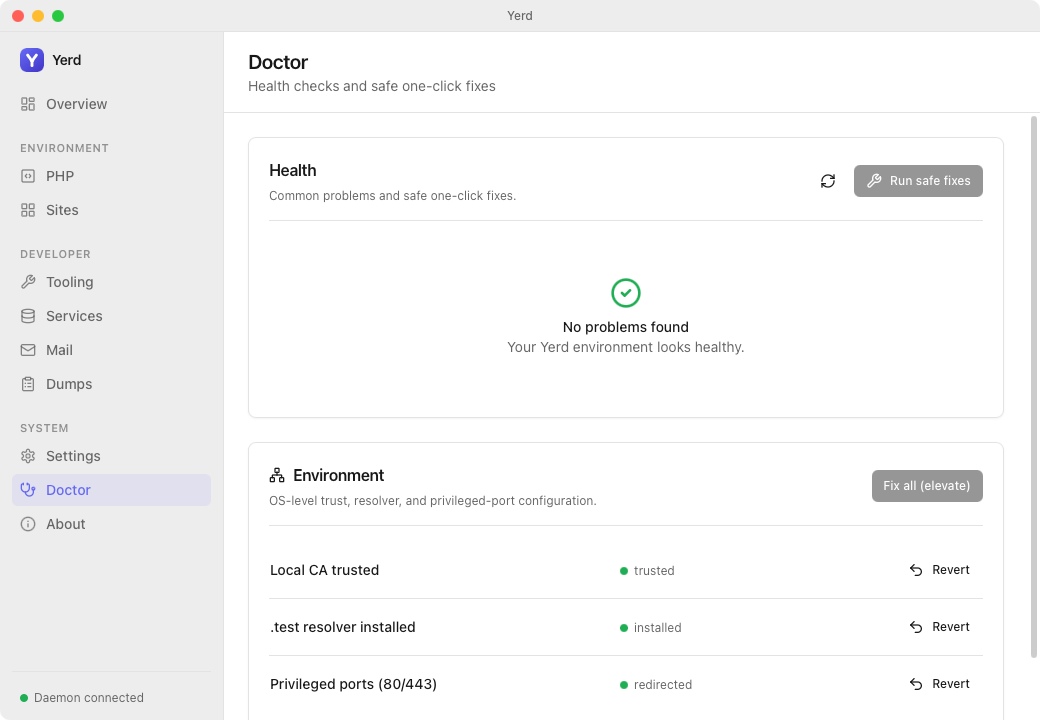
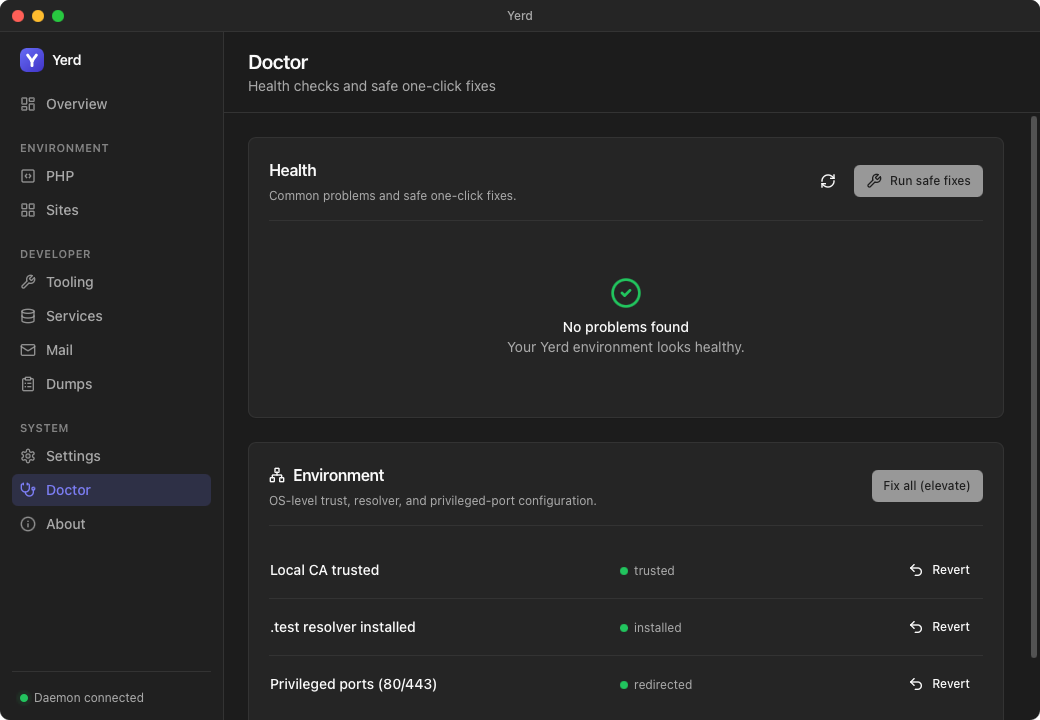
See Features for the rest of the GUI.
When the daemon won't start
If the app fails to start the daemon, it shows a diagnostics panel with hints derived from the daemon's own logs plus the last few lines of the macOS self-repair trail (yerd-gui-repair.log - see The Daemon). One case it recognizes: a running daemon whose config schema is newer than what the daemon build understands (an upgrade that didn't fully take effect) - the panel names it explicitly and suggests toggling the daemon's login item off then on in Settings to force re-registration, or removing any leftover old Yerd.app copies.
"Copy diagnostics" in that panel bundles the daemon log tail, the repair log tail, and the detected hints together, so a bug report carries everything in one paste.
From the command line
TIP
Add --json to either command for machine-readable output. Exit codes matter too: yerd doctor exits 1 on any hard failure, else 0.
yerd status
A read-only snapshot, rendered as one block. No flags beyond the global --json.
yerd statusA healthy machine looks roughly like this:
daemon    running (pid 4821, up 2h 13m, rss 6.2 MB)
version   2.0.2
tld       .test
http      80
https     443
dns       127.0.0.1:1053
ca        trusted: yes  (/Users/you/Library/Application Support/io.yerd.Yerd/ca/ca.cert.pem)
resolver  installed: yes
load      0.42 0.51 0.48
sites     3 parked, 1 linked, 2 secured

php
  8.5 (default)  running  pid 4830  /run/user/501/yerd/fpm-8.5.sock  rss 18.4 MB
  8.3            running  pid 4844  /run/user/501/yerd/fpm-8.3.sock  rss 17.1 MB
What each line means
| Line | Notes |
|---|---|
daemon | pid, uptime, RSS. The reverse proxy and DNS responder run inside the daemon, so one RSS figure covers all three. Omitted when it can't be read (non-Linux or transient failure). |
version | The running daemon's version. Shows unknown for daemons that predate version reporting. |
tld | The TLD served, e.g. .test. |
http / https | The bound port. A privileged-port fallback shows 80 → 8080 (fallback); an active macOS redirect shows 80 → 8080 (redirected). Reachable on the requested port either way. When neither the privileged port nor its fallback could bind, the line instead reads not serving - couldn't bind 8080 (run yerd doctor) - the daemon is up but serving no sites. See doctor's WebPortsUnbound. |
ports (conflict) | Only shown when a non-Yerd process is holding 80/443. Yerd confirms the redirect actually reaches its proxy (via a Server: yerd marker), so a foreign web server or a stale pf rule is reported as a conflict rather than mistaken for a live redirect. Run yerd doctor. |
dns | The address the embedded DNS responder is bound on, or not resolving - couldn't bind port 1053 (run yerd doctor) when something else already holds that port. This is a soft-fail: the daemon still runs (proxy, PHP pools, IPC), just without .test name resolution. See doctor's DnsPortUnbound. |
ca | trusted: yes / no / unknown, plus the CA cert path. unknown means the probe couldn't tell, and is not treated as untrusted. |
resolver | Whether the OS resolver routes *.<tld> to Yerd. Tri-state (yes / no / unknown). |
load | 1/5/15-minute load averages. Omitted where unavailable. |
sites | Parked, linked, and secured (HTTPS) counts. |
php | One line per installed version: state (running / stopped / failed), FPM master pid, listen socket, RSS, and update→<patch> when a newer patch exists. The default is marked (default). |
Why ports read "fallback"
Binding 80 and 443 needs elevation. Without it, the daemon falls back to rootless 8080/8443. On macOS, sudo yerd elevate ports installs a packet-filter redirect so 80/443 still reach the rootless listener; status shows (redirected) and doctor treats it as satisfied. See Elevation & Privileges and HTTPS & Certificates.
yerd doctor
Runs the full set of checks and prints each finding with a severity mark, an explanation, and the fix command where applicable.
yerd doctor⚠ Local CA not trusted
HTTPS sites will show certificate warnings until the CA is trusted.
→ sudo yerd elevate trust
✗ PHP-FPM pool failed
The PHP 8.5 FPM pool is not running.
→ fixed automatically by `yerd doctor fix`, or restart with `yerd use 8.5`When nothing is wrong:
✓ All checks passed
    Daemon, ports, DNS, CA, and PHP look healthy.
Severities
| Mark | Severity | Meaning |
|---|---|---|
✓ | Ok | Informational or healthy. Never affects the exit code. |
⚠ | Warn | A non-fatal problem worth addressing (e.g. CA not trusted). |
✗ | Fail | Breaks expected behaviour (e.g. no PHP, a dead pool). Any Fail exits 1. |
What doctor checks
| Code | Severity | Meaning | Remedy |
|---|---|---|---|
DaemonDown | Fail | The CLI couldn't reach the daemon over IPC. | yerdd |
WebPortsUnbound | Fail | Neither the privileged web ports nor their rootless fallback could bind (something else holds both) - the daemon is up but serving no sites. Supersedes PortFallback. | Free the ports, or change the fallback ports in Settings (Yerd ▸ General), then restart the daemon |
PortFallback | Warn | A privileged port (below 1024) fell back to rootless and isn't reachable on the requested port. | sudo yerd elevate ports |
ForeignWebListener | Warn | A process other than Yerd is listening on 80/443 (confirmed via the proxy's Server marker, so Yerd is never mistaken for the squatter). Cross-platform. Supersedes PortFallback - elevation can't bind a port someone else owns. | Stop the other web server, then sudo yerd elevate ports |
DnsPortUnbound | Warn | The DNS port (dns_port) is held by another process. The daemon still runs, just without *.test resolution - independent of the web-port checks above, so it surfaces even alongside WebPortsUnbound. | Free that port, or change it in Settings (Yerd ▸ General), then restart. Re-run sudo yerd elevate resolver if the port changed |
CaNotTrusted | Warn | The local CA isn't in the system trust store, so HTTPS shows warnings. | sudo yerd elevate trust |
PhpCaNotTrusted | Warn | The bundled PHP's CA bundle (cacert.pem) is missing or stale, so PHP HTTPS to .test fails with cURL error 60. Auto-fixable. | yerd doctor fix (rebuilds the bundle; restart Yerd if it persists) |
ResolverNotInstalled | Warn | The OS resolver doesn't route *.<tld> to Yerd's DNS. | sudo yerd elevate resolver |
NoPhpInstalled | Fail | No PHP versions installed. | yerd install php <default> |
DefaultPhpNotInstalled | Fail | The default PHP version isn't installed (others are). | yerd install php <default> |
FpmPoolFailed | Fail | A supervised FPM master died. Auto-fixable. | yerd doctor fix, or yerd use <version> |
PhpUpdateAvailable | Ok | A newer patch exists (notify-only; Yerd never updates silently). | yerd update php <version> |
ResolverBackupSaved | Ok | Installing the resolver replaced a pre-existing /etc/resolver/<tld> (e.g. a Valet/Herd leftover); a timestamped backup was saved. sudo yerd unelevate resolver restores it automatically. | (none) |
NoSites | Ok | No sites configured yet. | yerd park <dir> or yerd link <name> <dir> |
DomainShadowed | Warn | Two sites claim the same domain, so one was dropped from routing. Which site wins can depend on directory scan order, so it may change on restart (usually the result of a hand-edited config). | Make each site's domains unique with yerd domain remove or yerd domain primary |
AllGood | Ok | Nothing else is wrong. | (none) |
No false alarms
Several probes are tri-state. CA trust and resolver installation are flagged only when the daemon is certain they're absent; an unknown result stays silent. Likewise, NoPhpInstalled suppresses DefaultPhpNotInstalled, an active macOS port redirect suppresses PortFallback, and a ForeignWebListener conflict also suppresses PortFallback (the foreign-process warning is the accurate, actionable finding - elevating won't help while another process owns the port).
yerd doctor fix
Performs the safe, unprivileged repairs, then re-diagnoses and lists whatever still needs you.
yerd doctor fixapplied fixes:
✓ restarted PHP 8.5 FPM pool
still needs attention:
⚠ Local CA not trusted
→ sudo yerd elevate trustIf nothing was auto-fixable:
no automatic fixes were applicableAuto-fixes are safe-only
doctor fix only applies fast, idempotent, unprivileged repairs on its own: restarting a failed PHP-FPM pool, and rebuilding the bundled PHP's CA bundle (cacert.pem) when it's missing or stale. Everything privileged or consequential is left for you to run, surfaced under "still needs attention" with the exact command:
- Trusting the CA (
sudo yerd elevate trust) - Installing the DNS resolver (
sudo yerd elevate resolver) - Granting the port capability / redirect (
sudo yerd elevate ports) - Installing or updating PHP (
yerd install php …,yerd update php …)
WARNING
yerd doctor fix will not run sudo for you. Privileged fixes always require you to run the suggested sudo yerd elevate … command yourself. See Elevation & Privileges.
How fix works
1. daemon builds a StatusReport
2. plan_auto_fixes(report)  ->  failed FPM pools become RestartFpm; a stale PHP CA bundle becomes RebuildPhpCaBundle
3. daemon performs each restart, recording success/failure  ->  "applied fixes"
4. daemon re-builds a fresh StatusReport and re-diagnoses
5. remaining Warn/Fail findings  ->  "still needs attention"
Step 4 re-diagnoses against the post-fix world, so a successfully restarted pool won't reappear; a failed restart shows ✗ under "applied fixes" and the finding persists. The exit code follows that remainder: 1 only if a Fail still stands.
Putting it together
A typical troubleshooting loop:
yerd status          # what's the daemon doing now?
yerd doctor          # what's wrong and how do I fix it?
yerd doctor fix      # repair the safe stuff
sudo yerd elevate trust   # run any privileged command doctor surfaced
yerd doctor          # confirm everything is green
Related
- The Daemon - what
yerddsupervises and howstatusis assembled. - Elevation & Privileges - the privileged fixes doctor surfaces.
- PHP Versions - installing, the default, and FPM pools.
- HTTPS & Certificates and DNS & .test Domains - the CA-trust and resolver checks.
- CLI Reference - every command and flag.
- For the diagnosis logic, see the yerd-doctor crate and its source on GitHub.