
Elevation & Privileges
Yerd is rootless by design. The daemon (yerdd), the CLI (yerd), and the desktop app all run as your normal user. Only one step needs administrator rights: a one-time setup that wires Yerd into three OS subsystems your account can't touch on its own. Everything after that (parking sites, switching PHP, securing a site, restarting a pool) runs unprivileged.
Why elevation is needed
Three things can't be done as an unprivileged user, on any OS:
- Trusting the local CA. Yerd issues per-site certificates from a local CA. For the browser to show a padlock, that CA must go into the root-owned system trust store.
- Configuring the system resolver. Routing
*.testto Yerd's DNS responder means editing the OS resolver config under/etc(/etc/resolver/<tld>on macOS, or Yerd-owned systemd-resolved/NetworkManager snippets on Linux). - Binding ports 80 and 443. These are privileged ports; an unprivileged process can't bind them without help.
Herd and Valet require the same admin steps for the same reasons.
You don't have to elevate
Skip setup and Yerd still works: it falls back to rootless ports 8080/8443, serving over http://...:8080 (or you trust the CA yourself). Elevation buys the "just type the URL" experience, not basic functionality.
The one command
Run this once for the full experience. It's the only Yerd command that uses root:
sudo yerd elevateWith no subcommand, elevate does all three steps in order (trust, resolver, ports). Each runs independently, so a failure or skip in one doesn't abort the rest.
You can run one piece at a time:
sudo yerd elevate trust       # add the local CA to the system trust store
sudo yerd elevate resolver    # route *.test to yerd's DNS responder
sudo yerd elevate ports       # allow the daemon to serve on 80/443
Resolver elevation first checks the daemon's DNS health. If Yerd could not bind its configured DNS port, the command stops before changing OS resolver files and names the port to free (or change); restart Yerd after correcting it, then retry.
| Target | What it configures |
|---|---|
trust | Adds Yerd's local CA to the OS system trust store. |
resolver | Routes *.<tld> (e.g. *.test) queries to Yerd's DNS responder. |
ports | Lets the daemon serve on the privileged ports 80/443. |
Or use the GUI
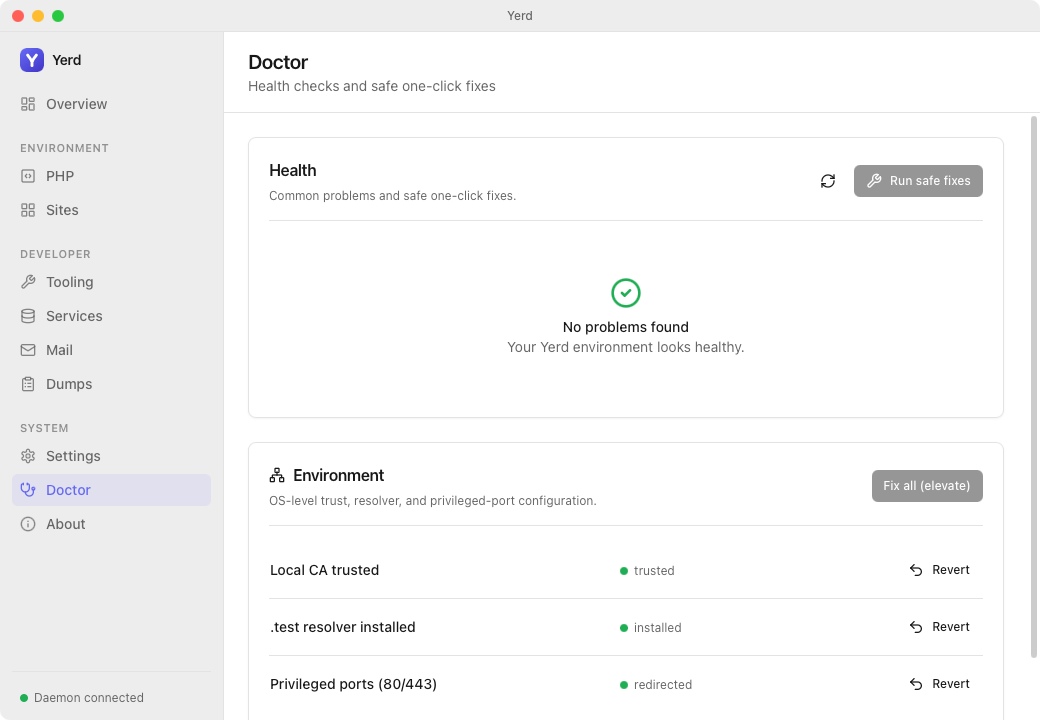
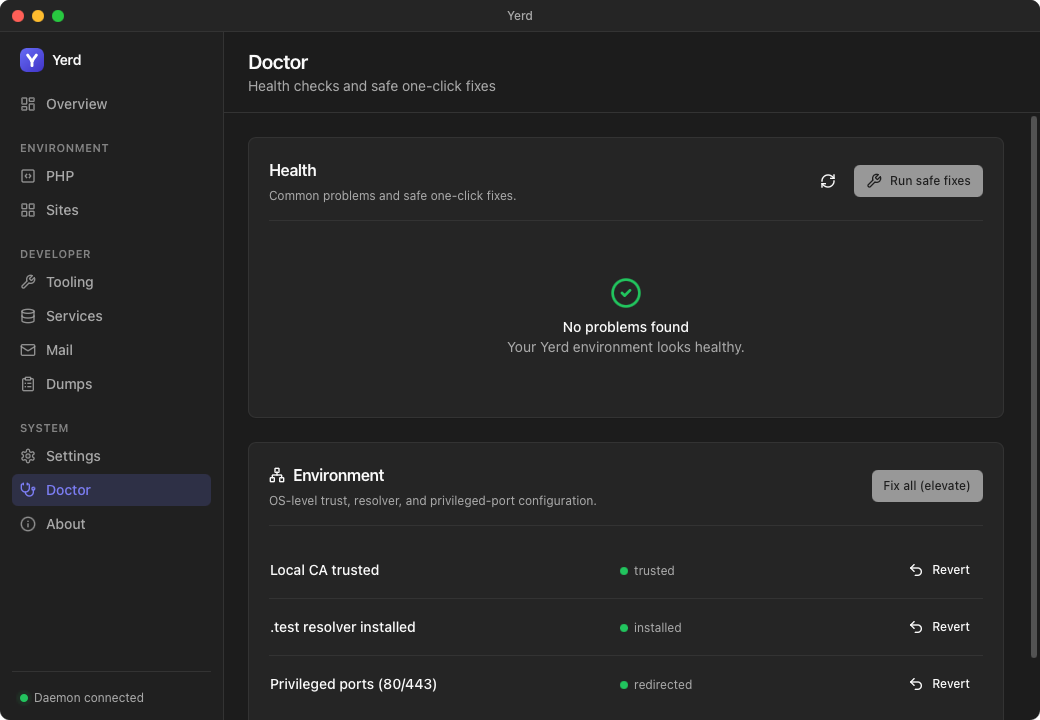
The desktop app's Doctor page mirrors this exactly - a Fix button per row (CA trust, .test resolver, privileged ports) runs the same yerd elevate helper under an OS prompt, and once a row is configured an Unelevate button reverts it.
Reverse any of it with unelevate, using the same targets:
sudo yerd unelevate           # revert everything elevate configured
sudo yerd unelevate trust     # remove the CA from the system trust store
sudo yerd unelevate resolver  # restore the prior resolver (macOS) / remove the route
Unelevate restores your previous resolver
On macOS, if elevate resolver replaced a pre-existing /etc/resolver/<tld> (a Valet/Herd leftover), it saved a backup. unelevate resolver restores that backup - returning DNS to its pre-Yerd state - and then clears the saved backups; with no backup it just removes Yerd's file. On Linux it removes all Yerd-owned systemd-resolved and NetworkManager snippets. unelevate ports is reversible on macOS only (see Ports).
Removing yerd entirely
sudo yerd uninstall runs this same unelevate (all three targets) as part of a full removal, then deletes the daemon, config, data, and binaries. Run it with sudo so the trust/resolver/port changes are reversed - they can't be undone once the yerd-helper binary is gone. See the Uninstall reference.
The helper only removes its own CA
unelevate trust (and the full uninstall) ask yerd-helper to remove a CA from the system trust store by fingerprint. Before deleting, the helper confirms the matched certificate is actually Yerd's (its Subject CN is Yerd Local CA) - so a stray or mistaken fingerprint can never make the privileged helper delete an unrelated trusted root. If it can't confirm ownership, it refuses and leaves the cert in place.
Start the daemon first
elevate reads facts from your running daemon over the per-user socket (CA path and fingerprint, TLD, DNS address, rootless ports). If it isn't running you'll see start the yerd daemon first, then re-run. Start yerdd as your user, then re-run sudo yerd elevate.
What each target does, per OS
The mechanics differ by platform; the intent is identical.
Trust
The CA cert is added to the system store, then the store is refreshed:
- macOS: added to
/Library/Keychains/System.keychainas a trusted root (security add-trusted-cert ... -r trustRoot). - Linux: copied into the distro's anchor directory and the store is rebuilt:
/usr/local/share/ca-certificatesthenupdate-ca-certificates(Debian/Ubuntu)/etc/pki/ca-trust/source/anchorsthenupdate-ca-trust extract(RHEL/Fedora)/etc/ca-certificates/trust-source/anchorsthentrust extract-compat(Arch)
elevate trust then also updates your browsers. On Linux (and for Firefox on macOS), Chromium-family browsers - Brave, Chrome, Chromium, Edge - and Firefox keep their own per-user certificate store (NSS) and ignore the system store above, so the system-store step alone is not enough for them. Yerd adds the CA to ~/.pki/nssdb (shared by Chromium-family) and to each Firefox profile, including Snap and Flatpak copies. This runs unprivileged as your user, so the browser stores stay user-owned.
Browsers need certutil
Updating the browser stores requires certutil, which is not installed by default on many distros. If Yerd reports it missing (and yerd doctor warns CaNotTrustedByBrowsers), install it and re-run sudo yerd elevate trust:
- Debian/Ubuntu/Zorin:
sudo apt install libnss3-tools - Fedora:
sudo dnf install nss-tools - Arch:
sudo pacman -S nss - macOS (only needed for Firefox; Safari/Chrome/Brave use the keychain):
brew install nss
A newly installed browser that has never been launched has no store yet; launch it once, then re-run sudo yerd elevate trust.
See HTTPS & Certificates for how the CA and leaf certs are generated.
Resolver
- macOS: writes
/etc/resolver/<tld>pointing at Yerd's DNS address, picked up at the next query (no restart). An existing file is backed up first, andunelevate resolverrestores that backup. - Linux: prefers a
systemd-resolveddrop-in. When/etc/resolv.confpositively identifies NetworkManager as its generator, Yerd can instead enable NetworkManager's dnsmasq plugin and add a per-TLD forwarding rule; this requiresdnsmasqandnmcli. Other resolver arrangements are skipped, and Yerd never edits/etc/resolv.confdirectly.
See DNS & .test Domains for the resolution model.
Ports
The platforms diverge most here.
Linux: grants
cap_net_bind_service=+epon theyerddbinary (setcap). The unprivileged daemon can then bind 80/443 directly. Restart the daemon (as your user) for it to take effect.setcap is reset by upgrades
The capability lives on the binary file, so replacing that file (a package upgrade) clears it. The Linux packages re-apply it on every upgrade (the
.deb's post-install and the Arch package's.installscriptlet); other install methods needsudo yerd elevate portsagain after upgrading. There's no clean reverse, sosudo yerd unelevate portsonly prints the manual command (sudo setcap -r <path-to-yerdd>).macOS: no
setcap. The helper installs apfredirect (rdr) mapping80 -> http_portand443 -> https_port, the rootless ports the daemon already bound. The daemon keeps its high ports; pf forwards the privileged ones. ALaunchDaemonre-applies the redirect at boot. It's live immediately (no restart) and fully reversible viasudo yerd unelevate ports. The daemon also polls for the redirect every few seconds, so a secure site'shttp://→https://redirect drops the:8443-style port from the URL shortly after you elevate (and brings it back if youunelevate) - no restart needed for that either.
The rootless fallback
If you never run elevate ports (or it can't apply), the daemon falls back to high ports. When binding the desired pair fails with a recoverable error (PermissionDenied, AddrInUse, or AddrNotAvailable), it drops any partial listener and retries on the fallback:
| Service | Privileged | Rootless fallback |
|---|---|---|
| HTTP | 80 | 8080 |
| HTTPS | 443 | 8443 |
So without elevation you can reach sites at http://my-app.test:8080 - if the resolver is installed.
Can't install the resolver at all?
If you have no admin rights to route .test, those names won't resolve anywhere. Yerd still serves every site through plain localhost - open http://localhost:8080/~my-app.test, or just http://localhost:8080/ and pick from the list. See Localhost Access for the full story (the /~ switch, the picker, the X-Yerd-Site API header, and the caveats).
Run yerd doctor to see which ports are live and what to do.
If even the fallback can't bind
Rare, but possible if something else already holds the rootless ports too: the daemon comes up with no web listener at all. yerd status reports "not serving" for both ports, and yerd doctor raises a hard WebPortsUnbound failure. In this state sudo yerd elevate ports refuses on macOS - a pf redirect needs a live bound port to point at, and there isn't one. Free a port, or change the fallback pair in Settings (Yerd ▸ General), then restart the daemon before elevating. See Diagnostics.
macOS port status
The macOS daemon always binds its high ports (pf does the 80/443 forwarding), so Yerd probes reachability rather than trusting that a config file exists. The probe also confirms it reaches Yerd's own proxy - it speaks HTTP to 127.0.0.1:80 and checks for the proxy's Server: yerd marker - so a redirect you've torn down (or a foreign web server squatting the port) is correctly reported as not redirected. If something that isn't Yerd holds 80/443, doctor raises a ForeignWebListener warning.
The security model
Elevation is tiny and tightly bounded. Yerd splits into three binaries with different privilege:
yerddowns all runtime state, the proxy, DNS, and PHP-FPM pools. Never runs as root.yerdis a thin client. Undersudo yerd elevateit runs as root only to orchestrate; it never does the privileged operation itself.yerd-helperis a strict one-shot binary. Each invocation does exactly one validated operation and exits with asysexits.h-style code.
The desktop app is also just a daemon client and never runs as root; its "Fix" actions shell out to sudo yerd elevate ... like you would, and the matching Unelevate buttons shell out to sudo yerd unelevate ... (behind an in-app confirm and the OS prompt). See Features.
What makes yerd-helper safe
The helper trusts no caller, not even the daemon:
- Effective-UID gate. Refuses to run unless its effective UID is 0 (Linux reads
/proc/self/status; macOS shells out to/usr/bin/idby absolute path). If/procis missing it reports "not root" rather than assuming privilege. - Frozen, typed argv contract. The CLI hands it one typed operation (
install-ca,uninstall-ca,install-resolver,uninstall-resolver,setcap,install-port-redirect,uninstall-port-redirect), nothing else. - Re-validation. Every argument is re-parsed before any side effect: paths must be absolute and existing, the TLD goes through
yerd-core'sTldtype, andsetcapis refused on any binary whose basename isn'tyerdd. - Fingerprint-pinned CA install. The helper reads the PEM, requires exactly one
CERTIFICATEblock, and verifies its SHA-256 matches the fingerprint passed on argv. This blocks swapping in a different PEM. - Hardened subprocesses. Any tool it runs (
security,pfctl,update-ca-certificates,systemctl, ...) is spawned withenv_clear()and a pinnedPATH(/usr/sbin:/usr/bin:/sbin:/bin), with the working directory set to/. It never touches the network. - Atomic writes. Files are written to a temp sibling,
fsync'd, andrename(2)'d into place with the mode set at creation, so there's no create-then-chmod race.
On the orchestration side, sudo yerd elevate adds two guards:
- It derives the
yerd-helperandyerddpaths from its own trustedcurrent_exesiblings, never from anything the daemon says, so a forged daemon can't aim root'ssetcapat an arbitrary binary. - Before trusting the daemon's CA path, it checks the path is owned by the invoking user (via
SUDO_UID) and not group/world-writable.
Reading the source
See bin/yerd/src/elevate.rs and the helper under bin/yerd-helper/src. For the developer breakdown see yerd-helper (privileged) and the Cross-Platform Model.
Reading the output
elevate narrates each step. A full run looks like:
==> trust: trusting the local CA in the system store
    ok
==> resolver: routing *.test → 127.0.0.1:1053
    ok
==> ports: granting cap_net_bind_service to yerdd
    ok
    restart the yerd daemon (as your user) for 80/443 to take effect.
Outcomes:
ok- succeeded (operations are idempotent, so re-running is safe).skipped (unsupported on this host)- the target doesn't apply here (e.g.resolveron Linux without a positively detected supported manager). The run continues.failed: ...- a real error; that target's exit status is reported and the command exits non-zero, but the other targets still run.
See also
- HTTPS & Certificates - the local CA and per-site certificates
- DNS & .test Domains - how
*.testresolution works - Diagnostics -
yerd doctorand what it checks - CLI Reference - full
elevate/unelevategrammar - yerd-helper (privileged) - the helper internals